Understanding Loop Constructs in Programming

It is also called a repetitive / iterative control structure. Sometimes we require a set of statements to be executed a number of times by changing the value of one or more variables each time to obtain a different result. This type of program execution is called looping. C++ provides the following constructs.
(i) while loop
(ii) do - while loop
(iii) for loop
While loop
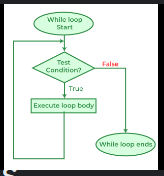
A while loop in C++ is a control flow statement that allows code to be executed repeatedly based on a given Boolean condition. The while loop can be thought of as a repeating if statement. Here is the basic syntax of a while loop:
while (condition) {
    // Code to be executed
}
How it works:
Initialization: Before the loop starts, you typically initialize a variable that will be used in the condition.
Condition: The loop checks the condition before executing the block of code. If the condition is
true, the code inside the loop is executed. If the condition isfalse, the loop terminates.Execution: The code inside the loop is executed.
Update: After the code inside the loop is executed, the condition is checked again. This process repeats until the condition becomes
false.
Example:
Here is a simple example of a while loop that prints numbers from 1 to 5:
Explain#include <iostream>
using namespace std;

int main() {
    int i = 1; // Initialization
    while (i <= 5) { // Condition
        cout << i << endl; // Execution
        i++; // Update
    }
    return 0;
}
In this example:
The variable
iis initialized to 1.The condition
i <= 5is checked before each iteration.The value of
iis printed.The variable
iis incremented by 1 after each iteration.The loop continues until
iis greater than 5.
do-while loop
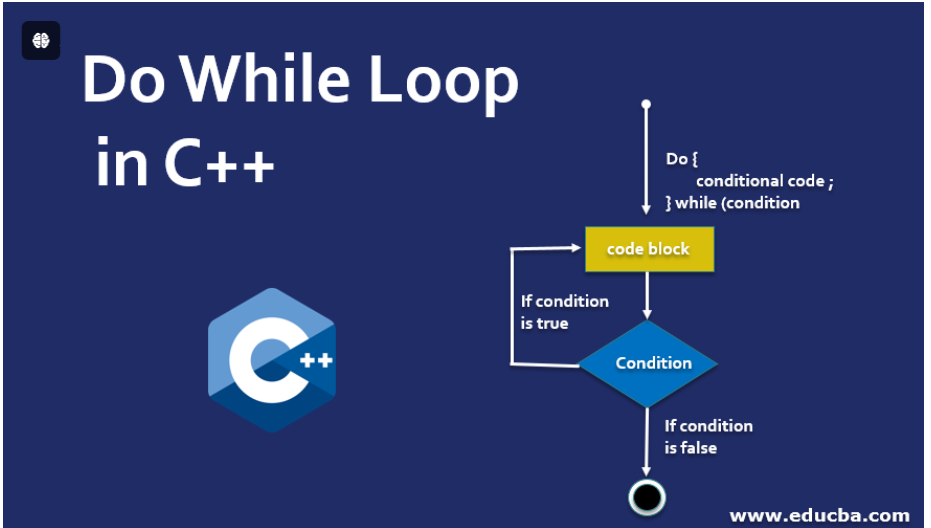
A do-while loop is a control flow statement that allows code to be executed at least once before the condition is tested. This differs from a traditional while loop, where the condition is checked before any code execution.
The syntax for a do-while loop typically looks like this:
do {
    // Code to be executed
} while (condition);
In this structure, the code block inside the do statement runs first. After the code executes, the loop checks the condition. If the condition evaluates to true, the loop repeats, running the code block again. If it’s false, the loop terminates, and the program continues with the next statement following the loop.
This can be particularly useful when you want to ensure that a set of instructions runs at least once—examples include user input validation where you want to prompt the user at least one time, regardless of their input validity.
Consider an example that prompts the user for a number until they enter a positive number:
let number;

do {
    number = parseInt(prompt("Enter a positive number: "));
} while (number <= 0);
In this case, the loop will keep asking for a number until the user provides a value greater than zero. Thus, the do-while loop is a handy tool in scenarios where initial execution is essential, paving the way for flexible and user-guided interactions in programming.
For loop
For loop is a fundamental programming construct that allows you to iterate over a sequence of elements, such as a list, tuple, or range. This iteration enables you to execute a block of code multiple times, which is particularly useful for tasks that require repetitive actions or processing of data.
Using a for loop, you can easily traverse through collections, apply functions, or accumulate results. The basic syntax varies slightly between programming languages, but the core concept remains the same.
In Python, a simple for loop looks like this:
for item in iterable:
    # Execute code block
Here, iterable might be a list of numbers, and item represents each element as the loop progresses. You can manipulate item within the loop to achieve your desired outcomes, whether it's summing numbers, printing values, or modifying data.
For instance, to print each number in a list, you would write:
numbers = [1, 2, 3, 4, 5]
for number in numbers:
    print(number)
This will output each number sequentially, demonstrating the efficiency and simplicity of using a for loop for iteration tasks. Thus, mastering the for loop is essential for effective and clean coding practices in programming.


